
WordPress can provide a flexible foundation for building that kind of website. Its large ecosystem of themes, plugins, integrations, and development tools makes it suitable for everything from small service websites to content-heavy platforms and ecommerce stores.
But installing WordPress and choosing an attractive theme does not automatically create an effective business website.
The quality of the final site depends on how well its structure, design, content, performance, security, search visibility, and customer experience work together.
Here are some of the areas I consider when building or improving a WordPress website for business.
Start With the Business Goal
Before choosing a theme, installing plugins, or designing the homepage, define what the website needs to accomplish.
Different businesses need different outcomes.
A professional service company may want visitors to request a consultation. An ecommerce business needs customers to discover products and complete purchases. A local business may depend heavily on phone calls, directions, and appointment requests. A content-driven company may prioritize newsletter subscriptions and organic search traffic.
These goals influence almost every design decision that follows.
The homepage hierarchy, navigation, calls to action, landing pages, forms, content strategy, and analytics should all support the website's primary objectives.
Without that direction, it is easy to build a website that looks polished but does not help the business accomplish much.

Build a Clear Website Structure
Visitors should not have to figure out how a website works.
A clear navigation structure helps people understand what the business offers and where they should go next.
For many business websites, the core structure may include pages such as Home, About, Services or Products, Portfolio or Case Studies, Blog or Resources, and Contact.
The exact pages will vary, but the principle remains the same: organize information according to what visitors are trying to find.
Avoid creating navigation simply because a theme provides space for it.
Every important page should have a purpose, and related content should be grouped logically.
A strong structure also helps search engines understand relationships between pages and provides opportunities for useful internal linking.
Design for the Customer, Not Just the Business
One of the easiest mistakes to make is designing a website entirely from the company's perspective.
Businesses naturally want to talk about themselves: their history, capabilities, awards, processes, and services.
Visitors are usually asking something different:
Can you solve my problem?
Good website design connects those two perspectives.
Instead of forcing visitors to read large amounts of company-focused content before understanding the offer, communicate the value clearly.
Headlines should explain what you do. Supporting content should provide enough context to build confidence. Calls to action should make the next step obvious.
Design is not only decoration. It helps establish hierarchy, direct attention, reduce confusion, and make information easier to understand.
Make the Homepage Work Harder
The homepage is often one of the most important pages on a business website.
It does not need to explain every detail about the company, but it should provide a strong overview and direct visitors toward deeper information.
A useful homepage often introduces the primary value proposition, key services or products, credibility indicators, important benefits, selected work or results where appropriate, and clear calls to action.
The order matters.
Visitors should be able to understand the business quickly before being asked to make a significant commitment.
Avoid filling the top of the page with vague statements such as “Welcome to Our Website” or language that could describe almost any company.
Use that valuable space to communicate what the business actually does and who it helps.
Choose Themes and Builders Carefully
WordPress provides an enormous selection of themes and visual page builders.
That flexibility is useful, but it can also introduce unnecessary complexity.
A theme may include dozens of features that a particular business never uses. A page builder can make layout creation easier while also generating additional markup, styles, scripts, or dependencies.
This does not mean page builders are inherently bad.
The important question is whether the chosen system is appropriate for the project.
Consider performance, ease of editing, long-term maintenance, responsive behavior, compatibility, and how difficult the website would be to manage if another developer needed to work on it later.
A simpler foundation is often easier to maintain than a website assembled from overlapping tools that all attempt to control the same parts of the page.
Be Selective With Plugins
Plugins are one of WordPress's greatest strengths.
They can add forms, ecommerce functionality, SEO tools, security features, caching, analytics integrations, backups, memberships, and thousands of other capabilities.
But more plugins do not automatically create a better website.
Every plugin introduces something that needs to be maintained. It may add database entries, scripts, styles, scheduled tasks, external requests, or dependencies.
Before installing one, ask whether the functionality is genuinely necessary and whether WordPress, the active theme, or an existing plugin already provides it.
It is also worth checking whether the plugin is actively maintained and compatible with the current WordPress environment.
The goal is not to use the fewest plugins possible. The goal is to use the right plugins for clear reasons.
Prioritize Website Performance
Business websites compete for attention.
Visitors should not have to wait unnecessarily for large images, scripts, animations, fonts, and third-party integrations to finish loading.
Start with the basics.
Resize and compress images before uploading them. Use modern formats such as WebP where appropriate. Review unnecessary CSS and JavaScript. Configure caching carefully. Keep plugins under control and choose hosting that can support the site's requirements.
Performance should also be tested on mobile devices rather than only on a fast desktop connection.
A visually impressive website that feels slow or unresponsive can create a weaker experience than a simpler website that responds immediately.
The goal is not merely to achieve a perfect testing score. It is to create a website that feels fast and reliable to real users.
Build With Mobile Visitors in Mind
Responsive design is now a basic requirement, but simply making a desktop layout fit on a smaller screen is not enough.
Mobile users interact differently.
Navigation needs to be easy to operate. Buttons should be comfortable to tap. Text should remain readable. Forms should not become frustrating. Images should scale appropriately, and important calls to action should remain visible without overwhelming the screen.
Long sections that look balanced on desktop may need different spacing or ordering on mobile.
Performance matters even more because mobile visitors may also be using slower connections.
Testing the actual experience at multiple screen sizes should therefore be part of development, not something added at the end.
Create Content for People First
WordPress makes publishing content easy, but publishing more content is not automatically an SEO strategy.
Useful content should answer real questions and help visitors understand the business, its services, and the problems it can solve.
Service pages should contain enough information to help someone evaluate the offer.
Blog articles should provide genuine value rather than existing only to target keywords.
Headings should organize information naturally. Internal links should help visitors discover related content. Images should support the topic rather than simply filling space.
Search optimization and readability can work together.
A well-structured article that answers the reader's question clearly is usually more valuable than content written primarily around repeated keyword phrases.
Build SEO Into the Website Structure
Search engine optimization works better when it is considered during development rather than added after the website is finished.
Important pages should have clear titles and headings. URLs should be understandable. Content should be organized logically. Internal links should connect related topics.
Technical considerations can include indexability, canonical URLs, redirects, structured data, image optimization, XML sitemaps, mobile usability, and page performance.
WordPress provides strong SEO capabilities through its core functionality and established SEO tools, but those tools still require sensible configuration.
An SEO plugin cannot compensate for unclear content, poor site architecture, slow pages, or weak user experience.
The strongest foundation combines good content with good technical implementation.
Make Calls to Action Clear
Every important page should give the visitor some idea of what to do next.
That does not mean covering the website with “BUY NOW” buttons.
A call to action should match the visitor's stage in the decision process.
Someone reading an educational article may be ready to explore a related service. Someone reviewing a service page may want to request a consultation. An ecommerce visitor may want to compare products before adding one to the cart.
Useful calls to action can include:
- Request a consultation
- View services
- See selected work
- Get a quote
- Learn more
- Subscribe for updates
- Add to cart or complete a purchase
Clarity usually works better than clever wording.
Reduce Friction in Forms and Contact Paths
A website can attract the right visitor and still lose the opportunity through a frustrating contact process.
Forms should request the information genuinely needed to respond effectively.
If an initial inquiry only requires a name, email address, and short project description, asking for fifteen fields may create unnecessary friction.
Forms should also work reliably.
Test submissions, confirmation messages, spam protection, email delivery, validation, and the mobile experience.
Providing alternative contact paths may also be useful depending on the business.
The objective is to make it easy for a qualified visitor to take the next step without making the process unnecessarily complicated.
Keep WordPress Secure and Updated
Launching the website is not the end of the project.
WordPress core, themes, and plugins should be maintained regularly.
Updates often include security patches, compatibility improvements, bug fixes, and new functionality.
Backups are equally important.
A reliable backup strategy should make it possible to recover the website if an update fails, files become corrupted, or another unexpected problem occurs.
Unused plugins and themes should also be reviewed rather than left installed indefinitely.
Security is not a single plugin or setting. It is an ongoing combination of maintenance, responsible access management, backups, updates, hosting practices, and sensible configuration.
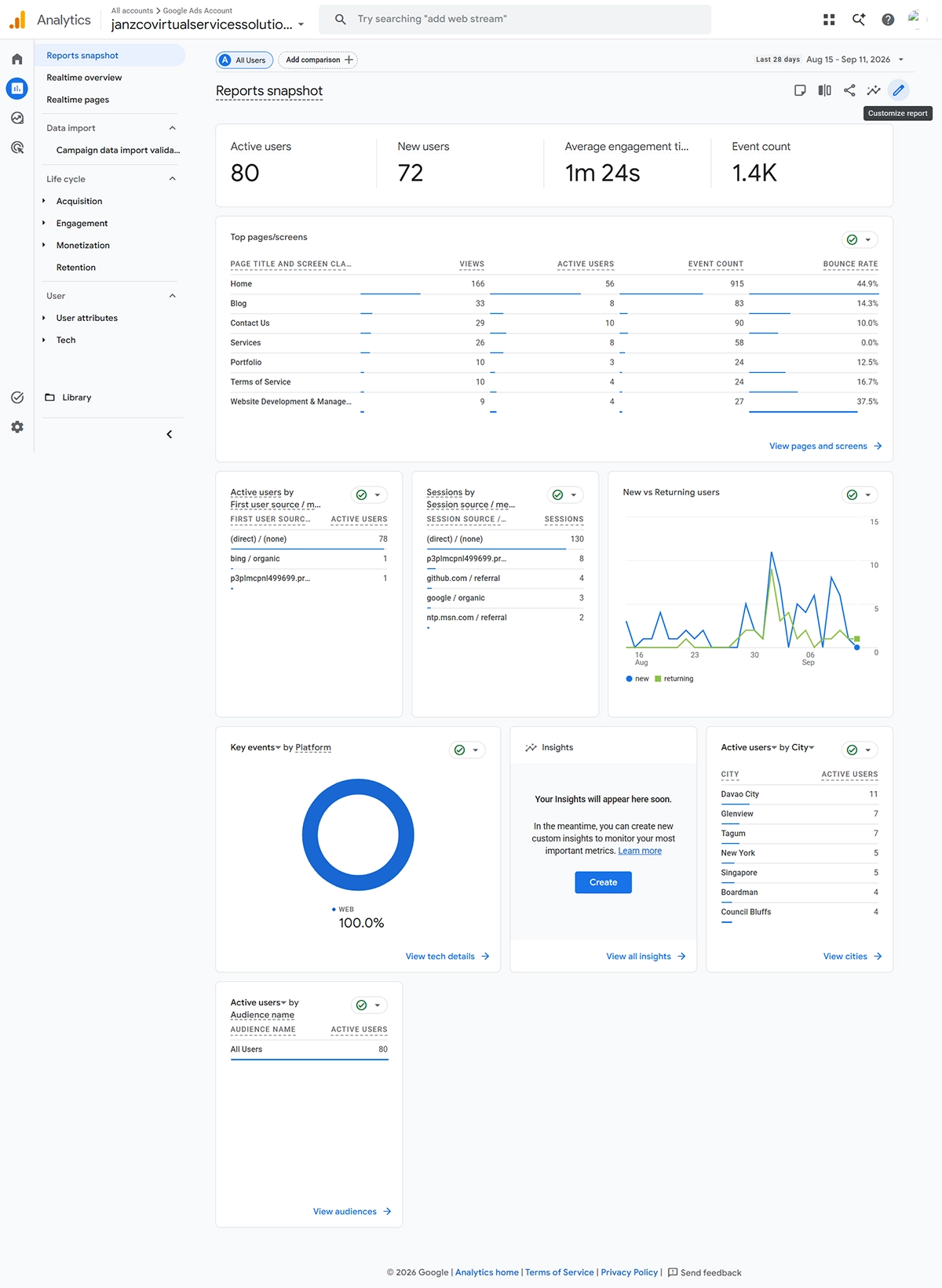
Measure What Visitors Actually Do
A business website becomes more useful when decisions can be informed by data.
Analytics and search performance tools can help reveal which pages attract visitors, how people discover the website, what content receives attention, and where opportunities for improvement may exist.
For example, a service page may receive substantial traffic but generate few inquiries. A blog article may attract search visitors but provide no clear path toward relevant services.
Those observations can lead to practical improvements.
Analytics should not exist simply because every website is expected to have analytics.
Use measurement to answer meaningful questions about the website and improve decisions over time.
Treat the Website as an Ongoing Business Asset
A business website should evolve.
Services change. Products change. Customer questions change. Search behavior changes. Technology changes.
A site that looked excellent at launch can gradually become outdated if nobody reviews it.
Periodically evaluate the content, design, forms, performance, integrations, analytics, security, and search visibility.
Remove outdated information. Improve pages that are not performing their role. Update screenshots and portfolio work. Review plugins and technical dependencies.
Small improvements made consistently can be more practical than waiting several years and rebuilding everything from scratch.
WordPress Is a Tool, Not the Strategy
WordPress can provide an excellent foundation for a business website, but the CMS itself does not determine whether the website succeeds.
The strategy behind it matters more.
A strong website combines business goals, customer understanding, useful content, thoughtful design, technical quality, performance, search visibility, and ongoing maintenance.
WordPress provides the platform.
How that platform is planned and implemented determines what the business gets from it.
Final Thoughts
Building a better WordPress website for business is not about installing more plugins, choosing the most elaborate theme, or following every new design trend.
It is about creating a website that performs a clear business function.
Visitors should quickly understand what the company offers. Navigation should feel natural. Pages should load efficiently. Content should answer useful questions. Calls to action should provide clear next steps. The website should remain secure, maintainable, and adaptable as the business grows.
When those pieces work together, WordPress becomes more than a content management system.
It becomes a practical digital platform for supporting the business.